
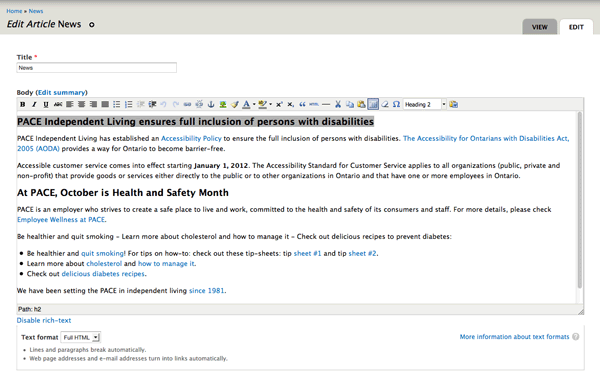
To Edit a page on the website, make sure you are logged in. At this point all Articles (and most pages on the pace-il.ca website are of type "Article") that you have Edit permission for will automatically have a "View" and a "Edit" tab. If you wish to Edit a page, hit the "Edit" tab and scroll down to the inline editor. Type text (or copy from plain text files) and use the Paste from Word icon (last icon: the folder with the little blue W sign) to copy/paste from MS Word (or any other program). MS Word (and other software) uses hidden code to control the layout and styling on pages. Much of that code is copied over and can adversely affect the layout/fonts of your content.
To make a subheading: highlight some text and click on Paragraph: select Heading 2. At this point Paragraph, Heading 2 and Heading 3 are the only preformatted styles for your pace-il.ca site. Don't forget to hit the "Save" button on the bottom when you're done!
PS - Slideshow edits and FAQ edits are also possible but are somewhat different (please see below for specific instructions on how to Edit these two content types).